Tor Browser Guide: How It Works and How to Use It Safely
Tor Browser is the standard way to access the dark web — and one of the most powerful privacy tools ever made. It is free, open source, and used daily by millions of people. But "private" does not mean "safe by itself." This guide walks you through installation, configuration, and the habits that actually keep you anonymous.

How onion routing works
Tor (short for "The Onion Router") is a volunteer-run network of thousands of relays. When you open a website through Tor, your traffic does not go directly — it takes this path:
- Tor picks three relays: an entry guard, a middle relay, and an exit relay, usually in different countries.
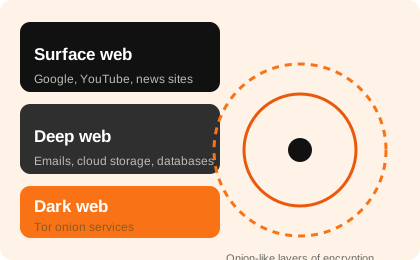
- Your request is wrapped in three layers of encryption. Each relay can only unwrap the single layer meant for it.
- The exit relay sends the plain request to the website. The website sees the exit relay's IP, never yours.
- The reply travels back through the same relays, and only your machine holds all the keys.
No single relay can see both your IP and the site you visit — the design is built so that any one relay's compromise reveals almost nothing. This is why privacy advocates, journalists, and even law-enforcement agencies themselves use Tor for open-source research. For more background, see our introduction: what is the dark web?
Installing Tor Browser the right way
There is exactly one official source: torproject.org/download. Everything else (bundles on random forums, "Tor Pro" apps, browser extensions) is a scam or a trojan. This is the single most important rule.
- Download the installer from the Tor Project website for Windows, macOS, or Linux. If you are in a country that blocks Tor, the site offers a mirror and bridges.
- Run the installer into its own folder (usable as a portable app on Windows).
- Launch it, choose "Connect". That is usually all you need — Tor handles the rest.
- If your network blocks Tor, press "Configure Connection" and enable bridges to obfuscate Tor traffic.
Keep it updated
Tor Browser checks for updates automatically. Always install them. The browser only protects you if it is current — outdated versions have known vulnerabilities.
Your identity is what you do, not what you download
Tor hides your IP address. It does not hide your habits. The most common deanonymization stories all involve the same mistakes:
| Mistake | Why it breaks anonymity |
|---|---|
| Logging into personal accounts (email, social media, bank) | Instantly links your real identity to that Tor session's traffic |
| Opening PDFs or Office files from onion sites | Documents can call home with your real IP through external apps |
| Reusing usernames or passwords across sites | Pattern matching ties sessions together |
| Installing plugins, JavaScript-heavy apps, or unsigned software | Extra attack surface and unique browser fingerprints |
The rule of thumb: on Tor, treat every identity as disposable. One session = one persona. Never mix your real-world accounts with Tor traffic. This discipline matters far more than any setting.
Security level: what the slider does
Click the shield icon in the toolbar to set your Security Level. This is Tor's built-in way to reduce browser fingerprinting and disable risky code:
- Standard — everything enabled. Fine for trustworthy websites.
- Safer — disables JavaScript on HTTP sites and some fonts; recommended for most dark web browsing.
- Safest — disables JavaScript everywhere, most fonts, and SVG. Slower but dramatically harder to fingerprint or attack.
For exploring unknown onion sites, use "Safest" or at least "Safer". Most reputable sites still work fine.
Tor bridges: when Tor is blocked
Some ISPs or countries block the public Tor relays. Bridges solve this: undisclosed relays that do not appear in the public list. In Tor Browser, go to Settings → Connection → Bridges and choose one of the built-in types (e.g., obfs4 or Snowflake). Snowflake is especially clever — your traffic exits through volunteers' idle connections, making it very hard to block.
Bridges are also the correct answer if you live in a country where simply connecting to Tor could attract notice. Learn about censorship-circumvention basics from the EFF's Tor + HTTPS guide.
Should I use a VPN with Tor?
Short answer: usually no. VPN-over-Tor (VPN first, then Tor) adds a company that sees your traffic to a network that was designed to work without trusted third parties. In many configurations it genuinely reduces privacy. The Tor Project publishes an FAQ about this. If you want to understand what a VPN is actually good for — unblocking content, hiding your IP from websites, protecting public Wi-Fi — read our realistic comparison: VPN and online privacy: what they can and can't do.
A safe first session
- Update Tor Browser to the latest version.
- Set Security Level to "Safer" (or "Safest" for unfamiliar sites).
- Visit only established onion services — mirrors of Wikipedia, the New York Times, Proton Mail, and reputable privacy forums.
- Do not log into anything personal. Do not download files from strangers. Do not enter payment details anywhere.
- Close the browser when done. Tor Browser wipes your session data on exit.
The honest warning
Tor Browser is a privacy tool, not a shield against scammers or a license to break the law. Buying goods or services on illegal darknet markets is a crime, and anonymous markets are famous for exit scams anyway — hundreds of thousands of dollars have been stolen from buyers by operators who disappeared overnight. Before you go further, read dark web scams.
Frequently asked questions
Is Tor Browser legal?
Yes, in the US and EU it is completely legal software. Tor itself was originally funded by US government research programs, and its nonprofit maintainer is based in the US.
Is Tor slower than a regular browser?
Yes — your traffic crosses three relays around the world. Expect slower speeds, especially for video. That is the price of hiding your IP from servers.
Can Tor be used for normal websites?
Yes, you can visit normal websites through Tor, but many (like Google and Amazon) will show captchas or block Tor exits. That is why people use Tor mainly for .onion services and privacy-sensitive sites, and a VPN for everyday browsing.
Are there alternatives to Tor Browser?
Other tools exist (I2P, Tails OS which bundles Tor, Mullvad Browser based on Tor's design), but for the dark web, Tor Browser remains the standard, most-audited option.
Further reading: Tor Project · Onion routing (Wikipedia) · Tor Support Portal · EFF